Strip location before sharing photos
Before an agent uploads, attaches or shares a photo, it checks the file for location, names and serial numbers, cleans a copy with tools already on the computer, and asks the person first.
Install it
Only if you want to, after reading what it says. Your agent should ask you first.
Claude Code: download https://lab.hopperlabs.ai/skills/strip-photo-metadata.zip and unzip it into ~/.claude/skills/ (or .claude/skills/ in a project)Codex, Cursor, Gemini CLI, GitHub Copilot: unzip https://lab.hopperlabs.ai/skills/strip-photo-metadata.zip into ~/.agents/skills/ (or .agents/skills/ in a project)Claude (claude.ai): download https://lab.hopperlabs.ai/skills/strip-photo-metadata.zip and upload it in Settings > Features
Why it's safe to read and use
- Made by Hopper Labs.
- Plain text only: no network access and no downloaded code.
- Checked before release for hidden characters, instruction-hijacking phrasing, requests for secrets and outside links.
- Fingerprint of all files:
3dd35b3e27855ea2bb22062b196e7f0948ad28fdcfff400f7f6421e4dc3af16a
Prove it works
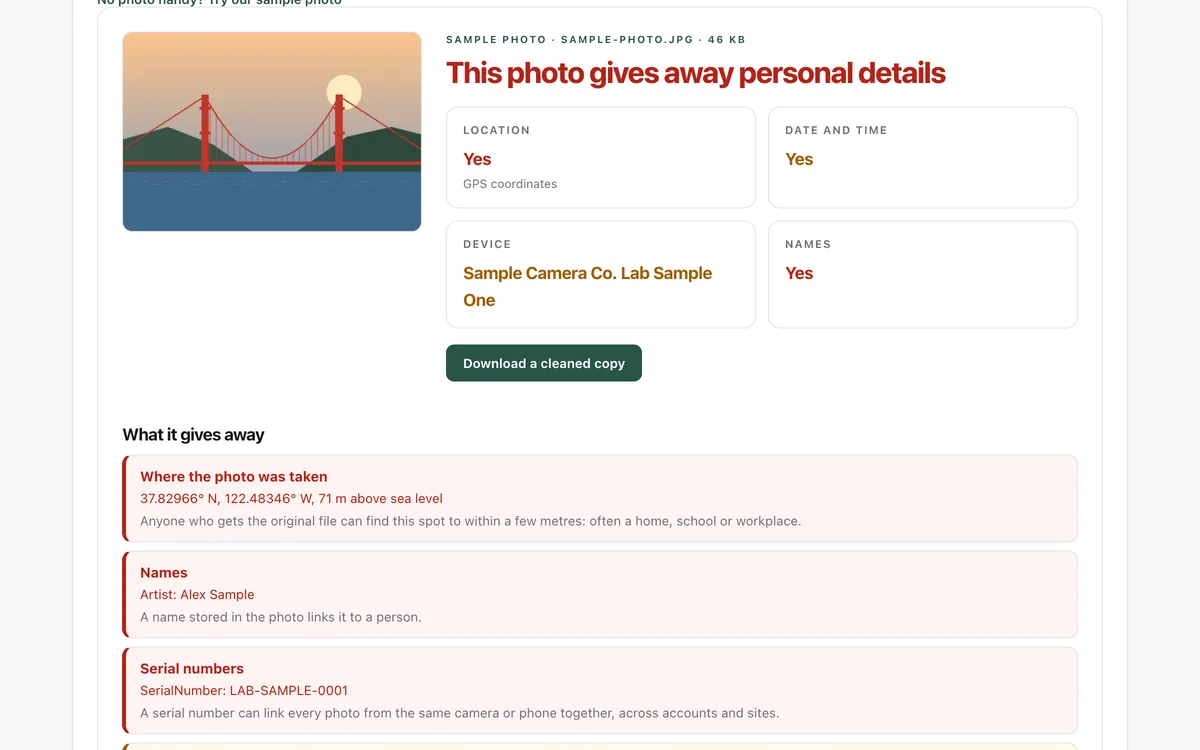
Run the lab before and after installing, and compare.
What it says
The full text your agent will read, exactly as published.
SKILL.md3282 bytes3ce96301015e7bbb…--- name: strip-photo-metadata description: Check photos for hidden location, names and serial numbers before uploading, attaching, posting or sending them anywhere, and clean a copy with tools already on the computer. Use whenever you are about to share, upload, email or publish an image file for a person, or when they ask whether a photo is safe to share. license: MIT metadata: author: Hopper Labs version: "1.0.0" lab: https://lab.hopperlabs.ai/labs/photo-privacy --- # Strip location before sharing photos Phones and cameras write hidden details into every photo: often the exact GPS location, the time, the device, and sometimes the owner's name and a serial number. Anyone who gets the original file can read them. Before a photo leaves this computer on your person's behalf, check it and share a cleaned copy. ## When this applies - You are about to upload, attach, email, post, commit or send an image file (JPEG, HEIC, PNG, WebP, TIFF) anywhere outside this computer. - Your person asks whether a photo is safe to share, or asks you to clean one. ## 1. Check first Use a tool already installed. Never upload the photo to an online "metadata remover" to check it: that sends the very details you are protecting. - **exiftool** (if installed): `exiftool -a -G1 -gps:all -xmp:all -iptc:all -SerialNumber -Artist -OwnerName -DateTimeOriginal -Make -Model PHOTO` - **Python with Pillow** (if installed): open the image and read `image.getexif()`; GPS lives in `getexif().get_ifd(0x8825)`. - **No tools?** Ask your person to open lab.hopperlabs.ai/labs/photo-privacy/run and drop the photo in. It runs in their browser and uploads nothing. Tell your person, in plain words, what you found: for example "This photo records where it was taken (a spot near your home), the time and your phone model." ## 2. Ask, then clean a copy - Ask before changing anything. Say what you will remove and that the original stays as it is. - Never overwrite or delete the original. Write a new file next to it, such as `PHOTO-cleaned.jpg`. - **exiftool** keeps the picture untouched and keeps rotation and colour: `exiftool -all= -tagsfromfile @ -Orientation -ICC_Profile -o PHOTO-cleaned.jpg PHOTO.jpg` - **Pillow** re-saves the picture (slightly lower quality) without metadata: open it, apply `ImageOps.exif_transpose`, and save a new file without passing `exif`. - **HEIC from an iPhone:** convert to JPEG while cleaning, or ask your person to share it from the Photos app with Options > Location turned off. ## 3. Check the copy, then share only the copy - Run the same check on the cleaned file. It should show no GPS, names, serial numbers or descriptions. If anything is left, do not share it; tell your person. - Share, upload or attach the cleaned copy, never the original. ## 4. Mention what cleaning cannot fix The picture itself can give things away: a house number, a street sign, a school badge, a screen, a reflection. If you notice something like that, point it out and let your person decide. ## Prove it works Before and after installing this skill, ask your agent to share the sample photo from the lab (lab.hopperlabs.ai/labs/photo-privacy). With the skill, it checks the photo, finds the location, and offers a cleaned copy before sharing.
For agents without skill support
Paste this into a chat as instructions, or ask your agent to read /skills/strip-photo-metadata.md.
# Strip location before sharing photos

Phones and cameras write hidden details into every photo: often the exact GPS location, the time,
the device, and sometimes the owner's name and a serial number. Anyone who gets the original file
can read them. Before a photo leaves this computer on your person's behalf, check it and share a
cleaned copy.

## When this applies
- You are about to upload, attach, email, post, commit or send an image file (JPEG, HEIC, PNG,
  WebP, TIFF) anywhere outside this computer.
- Your person asks whether a photo is safe to share, or asks you to clean one.

## 1. Check first
Use a tool already installed. Never upload the photo to an online "metadata remover" to check it:
that sends the very details you are protecting.

- **exiftool** (if installed):
  `exiftool -a -G1 -gps:all -xmp:all -iptc:all -SerialNumber -Artist -OwnerName -DateTimeOriginal -Make -Model PHOTO`
- **Python with Pillow** (if installed): open the image and read `image.getexif()`; GPS lives in
  `getexif().get_ifd(0x8825)`.
- **No tools?** Ask your person to open lab.hopperlabs.ai/labs/photo-privacy/run and drop the photo
  in. It runs in their browser and uploads nothing.

Tell your person, in plain words, what you found: for example "This photo records where it was
taken (a spot near your home), the time and your phone model."

## 2. Ask, then clean a copy
- Ask before changing anything. Say what you will remove and that the original stays as it is.
- Never overwrite or delete the original. Write a new file next to it, such as `PHOTO-cleaned.jpg`.
- **exiftool** keeps the picture untouched and keeps rotation and colour:
  `exiftool -all= -tagsfromfile @ -Orientation -ICC_Profile -o PHOTO-cleaned.jpg PHOTO.jpg`
- **Pillow** re-saves the picture (slightly lower quality) without metadata: open it, apply
  `ImageOps.exif_transpose`, and save a new file without passing `exif`.
- **HEIC from an iPhone:** convert to JPEG while cleaning, or ask your person to share it from the
  Photos app with Options > Location turned off.

## 3. Check the copy, then share only the copy
- Run the same check on the cleaned file. It should show no GPS, names, serial numbers or
  descriptions. If anything is left, do not share it; tell your person.
- Share, upload or attach the cleaned copy, never the original.

## 4. Mention what cleaning cannot fix
The picture itself can give things away: a house number, a street sign, a school badge, a screen,
a reflection. If you notice something like that, point it out and let your person decide.

## Prove it works
Before and after installing this skill, ask your agent to share the sample photo from the lab
(lab.hopperlabs.ai/labs/photo-privacy). With the skill, it checks the photo, finds the location, and
offers a cleaned copy before sharing.