Bot-check lab
What can a website tell about the browser that opened it?
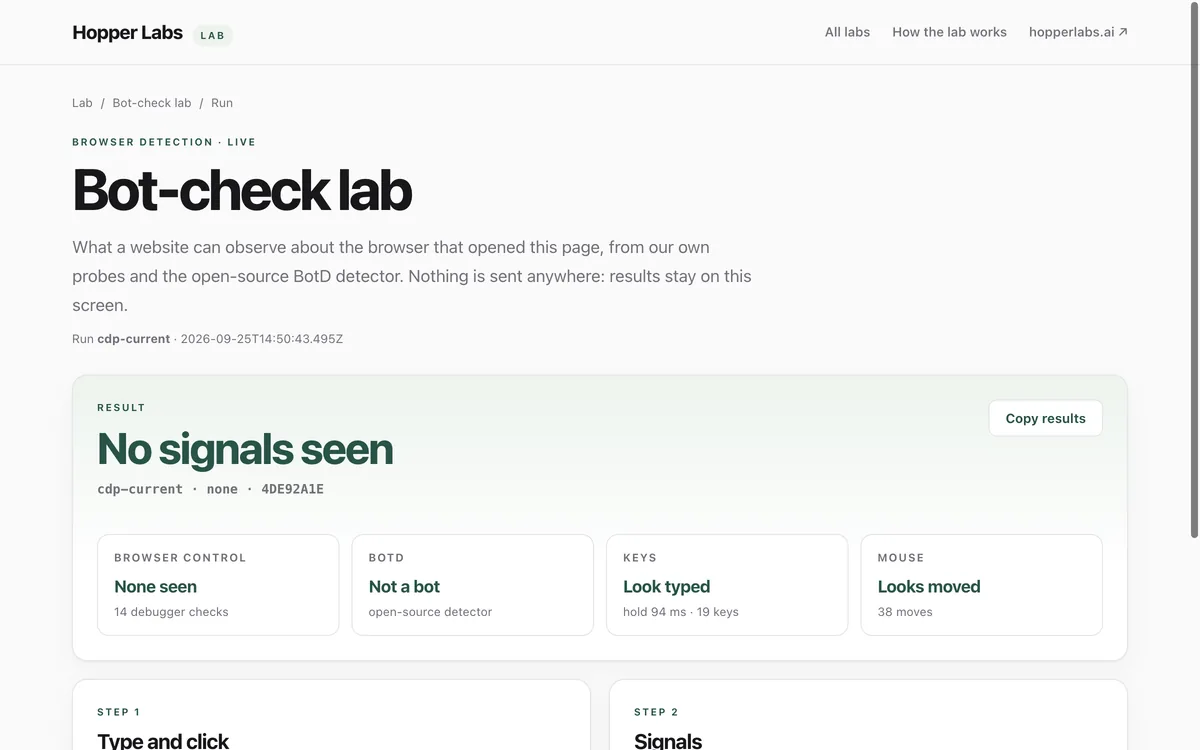
Our own probes and the open-source BotD detector look at the browser, the keys you type and the way the pointer moves, then explain every signal in plain English.
What it measures
Browser control
Whether the browser reports WebDriver control or a headless build, or has a debugger reading the page's console.
Keys
Whether typed keys carry physical key codes, Shift for capitals, and the key holds people make (about 50–150 ms).
Mouse
Whether the pointer moved before a click, and whether events came from the operating system or from page script.
BotD
The verdict of FingerprintJS's open-source bot detector, running unmodified on this page.
How to use it
- Open the lab. The browser checks start at once and repeat every second for a minute.
- Type Hello "Lab" 123 into the box and press Check input.
- Read the verdict and the four tiles. Every flag comes with a line on what it means.
- Use Copy results to keep the full report as JSON.
Good to know
- It shows what this page and BotD can see, not what any particular website runs.
- Each run covers one browser on one machine and one network.
- Results stay on your screen. Nothing is collected or sent anywhere.
Give your agent this skill
Try the lab, then let your AI agent keep what it teaches. Read the skill first; install it only if you want to.
What we found
How our own search browser and a few reference setups looked to this lab, one machine, one day.
How-to
Websites can tell a lot about the browser that opens them: whether a program is driving it, how keys are typed, how the pointer moves. This lab shows you exactly what one page can see, and explains each signal in plain English. Nothing is sent anywhere.
For you
- Open the Bot-check lab.
- Type
Hello "Lab" 123into the box and press Check input. - Read the verdict. Green tiles mean nothing looked unusual; each amber or red flag says what it means.
- Press Copy results if you want to keep the report.
For your AI agent
If your agent browses the web for you, ask it to run this lab on itself before it browses:
Open https://lab.hopperlabs.ai/bot-check, type Hello "Lab" 123 into the box, press Check input, and tell me the verdict and any flags.
For lasting habits, install the Considerate browser agent skill: it teaches an agent to pace like a person, never paste into fields a site is watching, and hand any "are you a robot?" check to you instead of trying to get around it.
What the results mean
- Browser control: signs that a program is steering the browser (WebDriver, a headless build, or a debugger reading the page's console).
- Keys: real keyboards send a physical key code, hold Shift for capitals, and keep each key down for about 50–150 ms. Scripts often don't.
- Mouse: people move the pointer to a button before clicking it.
- BotD: a second opinion from FingerprintJS's open-source bot detector.
Check that it's private
This lab runs entirely in your browser and sends nothing anywhere. You don't have to take our word for it:
- The browser enforces it. This site's security policy only lets pages talk to lab.hopperlabs.ai. This command shows
connect-src 'self':curl -sI https://lab.hopperlabs.ai/bot-check | grep -i content-security-policy - Every file is listed with its fingerprint and source commit in privacy.json, so you or your agent can compare them and read the code.
- Once the lab has loaded, turn off Wi-Fi: it keeps working, because it needs nothing from the network.