Fingerprint check
How unusual, and how headless, does your browser look?
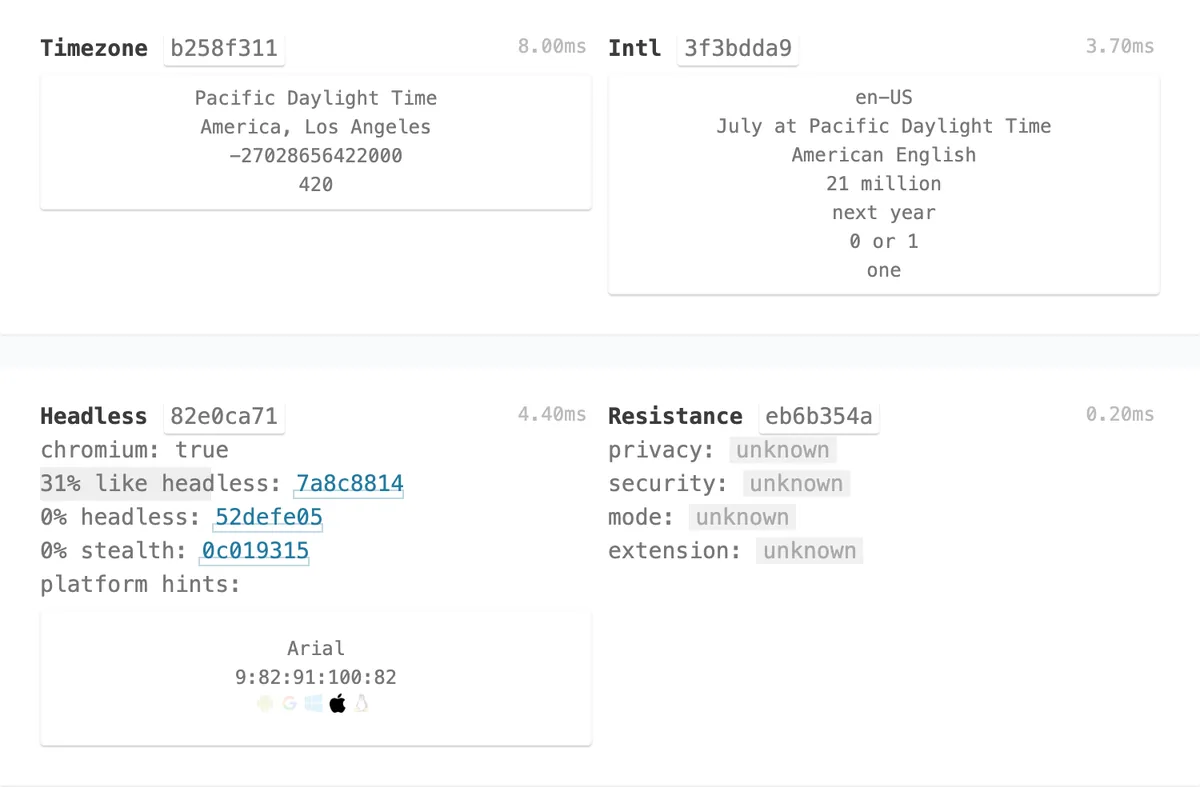
CreepJS, an open-source fingerprinting suite, scores the browser for headless and stealth traits and lists the details that make it recognisable.
What it measures
Headless score
The share of tests that only a headless browser fails.
Stealth score
Signs that a browser is hiding or faking its properties, as stealth plugins do.
Like headless
Traits headless browsers often share, many of which ordinary browsers have too.
Fingerprint
Time zone, language, fonts, graphics, audio and other details that together identify a browser.
How to use it
- Open the check and wait about thirty seconds while the tests finish (the WebRTC section shows as blocked on purpose).
- Find the Headless panel: headless, stealth and like-headless scores.
- Scroll for the full fingerprint. It is computed on your screen only.
Good to know
- CreepJS runs unmodified, in its own design. Its WebRTC test would contact Google's servers and reveal your IP address, and it would install a service worker, so Hopper Labs switches both off: those two sections show as blocked.
- Nothing is sent anywhere and nothing is installed.
- Scores describe these tests only, not any website's own detection.
What we found
Every setup we ran, including plain Chrome with nothing automated.
How-to
Every browser gives away small details (time zone, fonts, graphics card, language) that together can recognise it across websites. The fingerprint check runs CreepJS, a well-known open-source test suite, so you can see those details and how "headless" (automated) your browser looks.
For you
- Open the Fingerprint check and wait about thirty seconds.
- Find the Headless panel:
- headless: tests only a headless (automated) browser fails. 0% is what a normal browser shows.
- stealth: signs of a browser hiding or faking its properties. 0% is normal.
- like headless: traits headless browsers share with many ordinary browsers. On a Mac in light mode, 31% is normal.
- Scroll for the full fingerprint.
Privacy
CreepJS would normally contact Google's servers for its WebRTC test (which reveals your IP address) and install a service worker. Hopper Labs switches both off, so nothing leaves your browser and nothing is installed; those two sections show as blocked.
For your AI agent
Open https://lab.hopperlabs.ai/botlab/fingerprint/index.html, wait thirty seconds, and tell me the headless, stealth and like-headless scores.
Check that it's private
This lab runs entirely in your browser and sends nothing anywhere. You don't have to take our word for it:
- The browser enforces it. This site's security policy only lets pages talk to lab.hopperlabs.ai. This command shows
connect-src 'self':curl -sI https://lab.hopperlabs.ai/botlab/fingerprint/index.html | grep -i content-security-policy - Every file is listed with its fingerprint and source commit in privacy.json, so you or your agent can compare them and read the code.
- Once the lab has loaded, turn off Wi-Fi: it keeps working, because it needs nothing from the network.